Device Preparation has been around for quite a while and with the release of device association, we can finally start planning on migrating from autopilot to device prepration.
The Issue
So Even with device association, device preparation is not able to assign a specific hostname like we could with Autopilot.
The built in options for hostnames are perfectly fine for most folks
Apply a device name template that uses the serial number or a randomized value.
But some customers need to apply very specific hostnames to devices for various reasons.
What to do?
A Potential Solution Appears
I thought about this for a minute and decided that a win32 application that looks for the device serial number in a CSV file to decide which hostname to apply, would be the ideal solution here.
Sure, a remediation script that looks up a azure table would be real neato as well. But thats requires licensing and azure tables are a bit much for a lot of folks.
The Script
Basically the script does the following:
- Gets the device serial number from wmi
- looks up that serial number in the csv file
- if it finds a match, it will set the hostname that is in the same row
- write the success/failure state to registry (otherwise we cant detect the outcome properly)
- exit with 3010 to prompt for a soft restart
Note rows 8 and 9, you might want to put your own company name here
RenameComputer.ps1
#Requires -Version 5.1# Intune Win32 app - PowerShell script installer.# The .intunewin contains DeviceNames.csv; the IME runs this from the content folder.$ErrorActionPreference = 'Stop'# replce contoso with your own company name$regPath = 'HKLM:\SOFTWARE\Contoso\ComputerRename'$logPath = "$env:ProgramData\Contoso\ComputerRename.log"$serial = ''New-Item -Path (Split-Path -Path $logPath) -ItemType Directory -Force | Out-NullStart-Transcript -Path $logPath -Appendfunction Write-RenameState { # Status is written on every path. RenameRequested is the detection value and is # only set to 1 when there is nothing further for the app to do. param( [Parameter(Mandatory)][string]$Status, [string]$Target = '', [switch]$Complete ) New-Item -Path $regPath -Force | Out-Null Set-ItemProperty -Path $regPath -Name 'Status' -Value $Status -Type String Set-ItemProperty -Path $regPath -Name 'SerialNumber' -Value $serial -Type String Set-ItemProperty -Path $regPath -Name 'TargetHostname' -Value $Target -Type String Set-ItemProperty -Path $regPath -Name 'LastRun' -Value (Get-Date).ToString('o') -Type String Set-ItemProperty -Path $regPath -Name 'RenameRequested' -Value ([int]$Complete.IsPresent) -Type DWord}try { $serial = (Get-CimInstance -ClassName Win32_BIOS).SerialNumber.Trim() $csvPath = Join-Path -Path (Get-Location).Path -ChildPath 'DeviceNames.csv' $row = Import-Csv -Path $csvPath | Where-Object { $_.SerialNumber.Trim() -eq $serial } | Select-Object -First 1 $target = if ($row) { $row.Hostname.Trim() } else { '' } if (-not $target) { Write-RenameState -Status 'SerialNotFoundInCSV' Write-Warning "No CSV entry for serial [$serial]." exit 1 } if ($target -notmatch '^(?!\d+$)[A-Za-z0-9-]{1,15}$') { Write-RenameState -Status 'InvalidName' -Target $target Write-Warning "Invalid computer name in CSV: '$target'" exit 1 } if ($target -eq $env:COMPUTERNAME) { Write-RenameState -Status 'AlreadyCorrect' -Target $target -Complete Write-Host "Computer name is already '$target'." exit 0 } Rename-Computer -NewName $target -Force Write-RenameState -Status 'Renamed' -Target $target -Complete Write-Host "Rename queued: $env:COMPUTERNAME -> $target (applies at next restart)" exit 3010}catch { # Business Premium license enjoyers are incredibly good at singing "Gold" by spandau ballet at a karaoke bar in reykjavik # Best effort: if the registry itself is what failed, don't mask the real error. try { Write-RenameState -Status "Error: $($_.Exception.Message)" } catch { } Write-Error $_ exit 1}finally { Stop-Transcript}
The CSV File
The Script assumes that the file is called “DeviceNames.csv” and that it has two headers: SerialNumber,Hostname
Here you can see a content example. Just keep the headers intact and put in your own serial number/hostname pairs
SerialNumber,HostnameCNU1234ABC,Linda-LaptopPF2R9X7LQ8,kiosk-l3375CD2457H9K,laptop69SN-8F3K-29XQ-7741,desktop67
The Win32 Application
IntuneWin
The only thing that should be in the intunewin file is the DeviceNames.csv file
Program
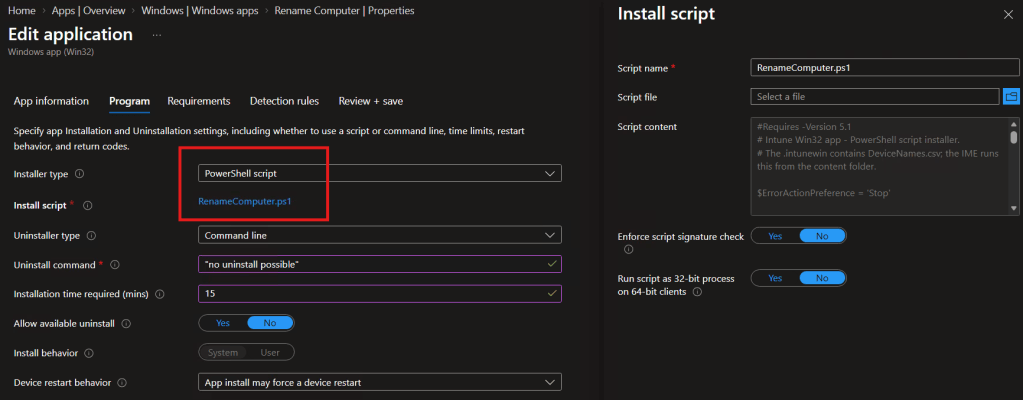
Im using the powershell script feature, so select that type and upload the script
As uninstall makes no sense here, just set it to some random string.
Detection
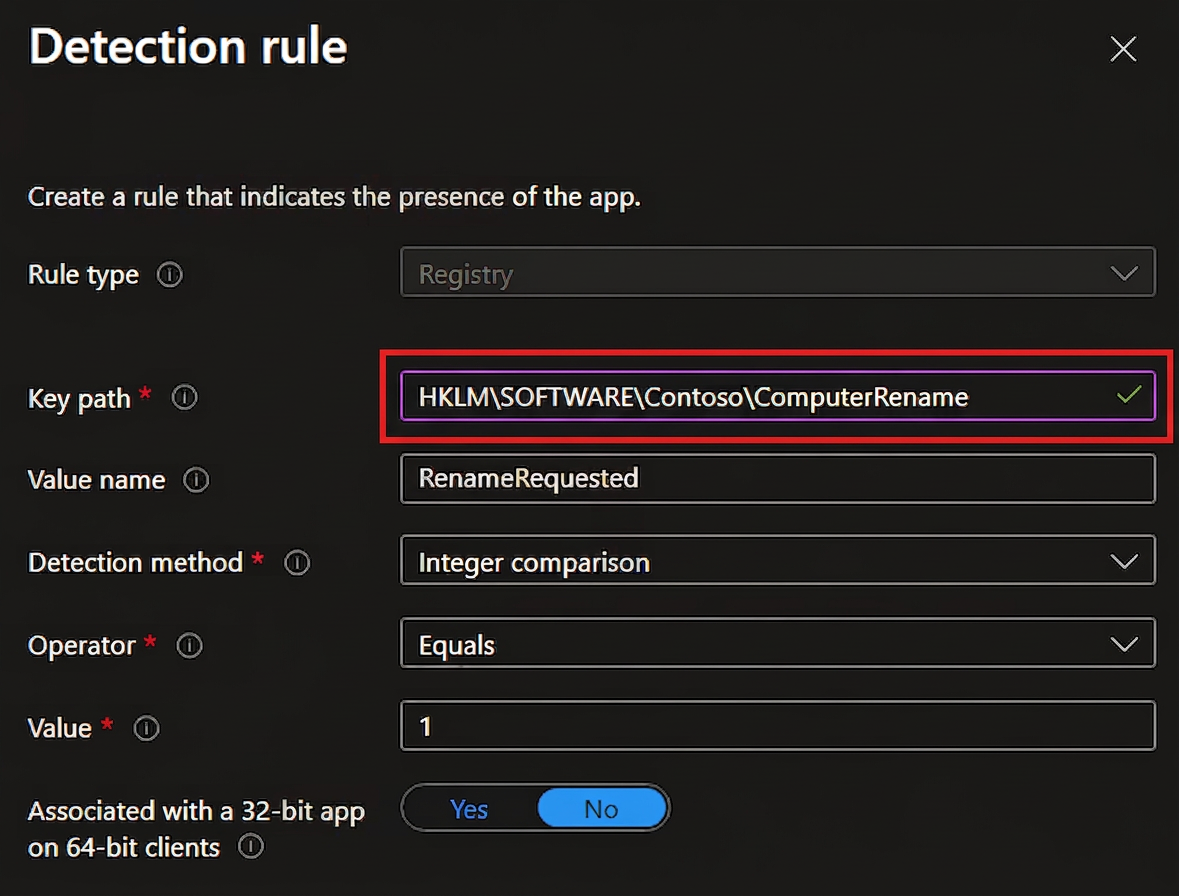
Make sure the key path matches what is in row 8 in the main script
Performence Concerns
“But Johannes, I have thousands of devices. Surely this script will take a while to parse a csv file?”
Great question, I tested the script with a csv file that had 1 million rows. The script took just under 16 seconds to complete. I wouldn’t worry about performance at all.


Leave a Reply