Intro
So how do I talk about the HP Wolf Security apps that came pre-installed on a shipment of laptops we ordered, in a polite way?
I guess we will never know.
Problems
Lets just list the issues I had with wolf security
- Autopilot became unreliable
- Applications failing to install
- Documents getting blocked from opening
- Apps failing to launch
Etc etc, no one enjoyed having a wolf on their laptop.
The various scripts that I found online were somewhat unreliable. They didn’t remove everything or they couldn’t handle some particular scenarios that could happen.
So I figured I should do something on my own.
Two Part Solution
So to make this more reliable and work in my environment, I split the solution in two
- Stop the wolf autoupdater
- Uninstall the apps in a reliable way
Platform Script
Since platform scripts run very early in the autopilot process. they are ideal to “set the stage”
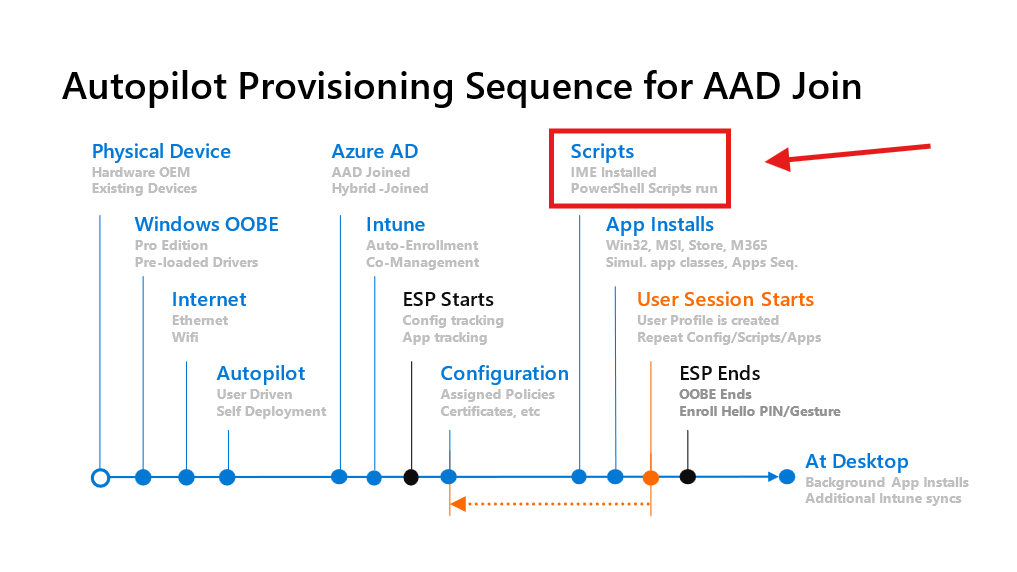
This platform script has a singular purpose is to disable the auto updating of wolf security during autopilot.
If wolf security starts to auto update, it can and will break the automated uninstall attempts.
Not to mention that pre-installed applications updating on their own without the involvement of autopilot/intune, will absolutely cause weird problems while autopilot is running.
# disable the auto update for wolf security to prevent weird issues# first make sure this is only attempted on a HP device$manufacturer = Get-CimInstance Win32_ComputerSystem | Select-Object -ExpandProperty manufacturerif ($manufacturer -like "*hp*"){ # disable the services Get-Service "hpsvcsscan" -ErrorAction SilentlyContinue | Set-Service -StartupType Disabled Get-Service "hpsvcsscan" -ErrorAction SilentlyContinue | Stop-Service -Force Get-Service "SecurityUpdateService" -ErrorAction SilentlyContinue | Set-Service -StartupType Disabled Get-Service "SecurityUpdateService" -ErrorAction SilentlyContinue | Stop-Service -Force exit 0}else { # nothing to do exit 0}
Win32 App
Right so, why not just do all of this in the platform script during autopilot?
First, our device provisioning is supposed to be under 5 minutes, and this can throw a wrench in that.
Second, the less you do during the enrollment status page, the more reliable it is.
And thats why I the uninstall app runs after autopilot in my environment, but feel free to do this differently.
If its a Win32 app, it will keep trying to uninstall the wolf security apps until the detection logic reports an all clear.
This was an excellent opportunity to make use of the new “powershell script” uninstaller type. just upload the script directly instead of wrapping it as a intunewin file.
pro tip: win32 apps still require a intunewin file, but you can simply make a dummy intunewin file that contains a picture of adam gross.
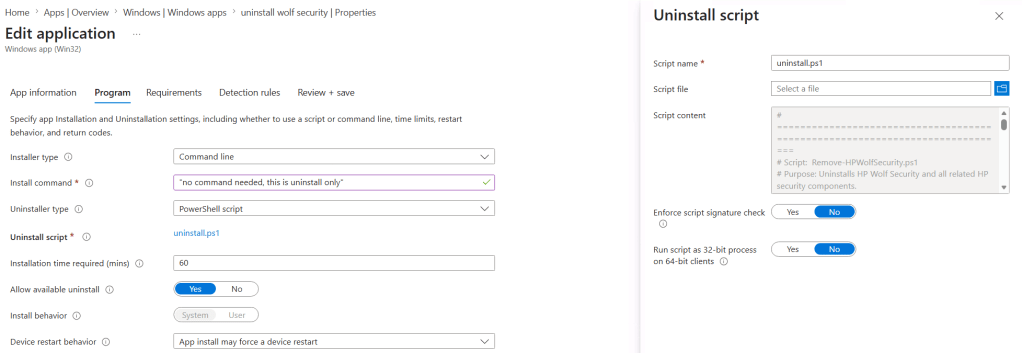
The script that uninstalls the wolf security apps:
# =============================================================================# Script: Remove-HPWolfSecurity.ps1# Purpose: Uninstalls HP Wolf Security and all related HP security components.# Context: Run as SYSTEM (Intune device-assigned script or Win32 app).# Logging: Outputs to $env:TEMP\Remove-HPWolfSecurity.log# Exit Codes:# 0 = Success (all components removed)# 1 = Partial success (some components failed)# =============================================================================$LogPath = Join-Path $env:TEMP "Remove-HPWolfSecurity.log"Start-Transcript -Path $LogPath -Appendfunction Log { param([string]$Message) Write-Host "$(Get-Date -Format 'yyyy-MM-dd HH:mm:ss') - $Message"}function Get-InstalledAppFromRegistry { param ([string]$DisplayName) $registryPaths = @( "HKLM:\SOFTWARE\Microsoft\Windows\CurrentVersion\Uninstall\*", "HKLM:\SOFTWARE\WOW6432Node\Microsoft\Windows\CurrentVersion\Uninstall\*" ) foreach ($path in $registryPaths) { $apps = Get-ItemProperty $path -ErrorAction SilentlyContinue | Where-Object { $_.DisplayName -like "*$DisplayName*" } foreach ($app in $apps) { [PSCustomObject]@{ DisplayName = $app.DisplayName UninstallString = $app.UninstallString QuietUninstall = $app.QuietUninstallString RegistryPath = $path } } }}function Invoke-UninstallFromRegistry { param ([string]$AppName) $app = Get-InstalledAppFromRegistry -DisplayName $AppName | Select-Object -First 1 if ($app) { $uninstallCmd = if ($app.QuietUninstall) { $app.QuietUninstall } else { $app.UninstallString } if ($uninstallCmd) { Log "Uninstalling $($app.DisplayName) using: $uninstallCmd" try { Start-Process -FilePath "cmd.exe" -ArgumentList "/c", "$uninstallCmd" -Wait -NoNewWindow Log "Successfully uninstalled $($app.DisplayName) via registry." return $true } catch { Log "Failed to uninstall $($app.DisplayName) via registry: $_" return $false } } else { Log "No uninstall string found for $($app.DisplayName)" return $false } } else { Log "$AppName not found in registry." return $true }}function Retry-Uninstall { param ( [string]$AppName, [int]$MaxAttempts = 3, [int]$DelaySeconds = 10 ) $attempt = 1 $success = $false while ($attempt -le $MaxAttempts -and -not $success) { Log "[$AppName] Attempt $attempt of $MaxAttempts..." $pkg = Get-Package -AllVersions -ErrorAction SilentlyContinue | Where-Object { $_.Name -like "$AppName*" } | Select-Object -First 1 if ($pkg) { try { $pkg | Uninstall-Package -Force -ErrorAction Stop Start-Sleep -Seconds $DelaySeconds $check = Get-Package -AllVersions -ErrorAction SilentlyContinue | Where-Object { $_.Name -like "$AppName*" } if (-not $check) { Log "[$AppName] Successfully uninstalled via PackageManagement." $success = $true } else { Log "[$AppName] still detected after uninstall. Retrying..." } } catch { Log "[$AppName] PackageManagement uninstall failed: $_" } } if (-not $success) { $success = Invoke-UninstallFromRegistry -AppName $AppName if (-not $success) { Log "[$AppName] still detected after registry uninstall. Retrying..." } } if (-not $success) { Start-Sleep -Seconds $DelaySeconds } $attempt++ } return $success}# --- Main Execution ---$overallSuccess = $true$coreApps = @( "HP Client Security Manager", "HP Wolf Security", "HP Wolf Security - Console", "HP Wolf Security Application Support", "HP Security Update Service")foreach ($app in $coreApps) { $result = Retry-Uninstall -AppName $app if (-not $result) { $overallSuccess = $false }}$legacyApps = @( "HP Sure Click", "HP Sure Click Security Browser", "HP Sure Sense", "HP Sure Sense Installer", "HP Sure Run", "HP Sure Recover")foreach ($app in $legacyApps) { $result = Retry-Uninstall -AppName $app if (-not $result) { $overallSuccess = $false }}# --- Remove AppX / UWP packages ---$HPIdentifier = "AD2F1837"$installedAppx = Get-AppxPackage -AllUsers | Where-Object { $_.Name -match "^$HPIdentifier" }$provisionedAppx = Get-AppxProvisionedPackage -Online | Where-Object { $_.DisplayName -match "^$HPIdentifier" }foreach ($provPkg in $provisionedAppx) { Log "Removing provisioned package: $($provPkg.DisplayName)..." try { Remove-AppxProvisionedPackage -PackageName $provPkg.PackageName -Online -ErrorAction Stop | Out-Null Log "Removed provisioned package: $($provPkg.DisplayName)" } catch { Log "Failed to remove provisioned package: $($provPkg.DisplayName)" $overallSuccess = $false }}foreach ($appxPkg in $installedAppx) { Log "Removing Appx package: $($appxPkg.Name)..." try { Remove-AppxPackage -Package $appxPkg.PackageFullName -AllUsers -ErrorAction Stop | Out-Null Log "Removed Appx package: $($appxPkg.Name)" } catch { Log "Failed to remove Appx package: $($appxPkg.Name)" $overallSuccess = $false }}Stop-Transcript# --- Exit with Intune-friendly code ---if ($overallSuccess) { Log "All components removed successfully." exit 0} else { Log "Some components failed to uninstall. Manual review may be required." exit 1}


Leave a Reply