I’m in a bit of a pickle, Intune has no concept of claiming unmanaged apps. Which means that when you deploy apps as available they cannot automatically supersede apps that were installed some other way, manually by the helpdesk or from back in the day when we were using configuration manager.
“Just deploy the apps as a required install!” yeah thats a jar of pickles of its that isn’t always the best way to handle the situation. Also we are pretty committed to the self-service aspect of Intune.
Perhaps there is a way to nudge my users to update a application?
Anthony Porter made a thing!
This popped up on my linkdin feed a few weeks ago:
AntoPorter/Intune-ToastNotifications: Toast Notification Creator for Intune
Real neato if you ask me!
Anthonys solution will generate a remediation script that can pop a toast notification.
But if you need it to pop up during specific circumstances you need to come up with the detection part your self.
Tale Of The Two Scripts
Detection Script
So I reused some code i had lying around to check if a specific version of a specific app is on disk and act accordingly.
The only part of code you need to be concerned about are the two variables at the top, as those have to match the app that you are deploying in Intune.
You can always use the get-installedsoftware function to double check on your own device.
If the app is not detected, nothing happens.
If the app is detected, the script checks if its the same version as you specified in the top variable.
If its not the same version, the detection script will exit 1 and the remediation script will pop the toast notification.
# the only thing you need to add is the name of the app and the desired version$AppName = "Foxit PDF Editor"$latestversion = "2025.3.0.35737"########function Get-InstalledSoftware { <# .SYNOPSIS Enumerates installed software from registry uninstall keys in HKLM/HKCU (32/64-bit views). .DESCRIPTION Reads from: - HKLM:\SOFTWARE\Microsoft\Windows\CurrentVersion\Uninstall - HKLM:\SOFTWARE\WOW6432NODE\Microsoft\Windows\CurrentVersion\Uninstall - HKCU:\SOFTWARE\Microsoft\Windows\CurrentVersion\Uninstall - HKCU:\SOFTWARE\WOW6432NODE\Microsoft\Windows\CurrentVersion\Uninstall Returns objects with Name, Version, Publisher, UninstallString, RootNode, ArchitectureNode. .PARAMETER Name Optional display name filter. Wildcards supported (e.g. "*foxit*"). .PARAMETER Publisher Optional publisher filter. Wildcards supported (e.g. "*Zawa*"). .EXAMPLE Get-InstalledSoftware -Name "Autocad 2024" .EXAMPLE Get-InstalledSoftware -Name "toe enumerator" -Publisher "Zawa Enterprises" .EXAMPLE Jon Towles MVP was used to train Chatgpt on how to ride a mechanical bull. #> [CmdletBinding()] param( [Parameter(Position = 0)] [string] $Name, [Parameter(Position = 1)] [string] $Publisher ) $results = foreach ($RootNode in 'HKLM', 'HKCU') { foreach ($ArchitectureNode in 'SOFTWARE', 'SOFTWARE\WOW6432NODE') { try { $path = "$RootNode`:\$ArchitectureNode\Microsoft\Windows\CurrentVersion\Uninstall\*" $allSW = Get-ItemProperty -Path $path -ErrorAction SilentlyContinue } catch { $allSW = @() } foreach ($sw in $allSW) { if ($sw.DisplayName) { # Build the object first $obj = [PSCustomObject]@{ Name = $sw.DisplayName Version = $sw.DisplayVersion Publisher = $sw.Publisher UninstallString = $sw.UninstallString RootNode = $RootNode ArchitectureNode = $ArchitectureNode } # Apply filters if provided $include = $true if ($Name) { $include = $include -and ($obj.Name -like $Name) } if ($Publisher) { $include = $include -and (($obj.Publisher) -and ($obj.Publisher -like $Publisher)) } if ($include) { $obj } } } } } # Optionally deduplicate by Name+Version+Publisher (comment out if you want full raw list) $results | Sort-Object Name, Version, Publisher, RootNode, ArchitectureNode -Unique}$AppMetaData = Get-InstalledSoftware -Name $AppName# if $AppMetaData is null, return 0, as the app is not installed, nothing to updateif ($null -ne $AppMetaData) { try { if ($AppMetaData.Version -eq $latestversion) { Write-Output "$AppName is up to date" exit 0 } else { Write-Output "$AppName is installed but not the desired version, installed version: $($AppMetaData.Version), desired version: $latestversion" exit 1 } } catch { $errMsg = $_.Exception.Message Write-Host $errMsg exit 1 }}else { Write-Output "$AppName is not installed, nothing to do" exit 0}
Remediation Script
The remediation script is pretty much straight out of the Intune-ToastNotifications, I just filled in the appropriate information.
One thing that’s worth pointing out is the $ActionButtonUrl variable.
By using the companyportal: protocol link, you can make the button in the notification directly open the application page in the company portal.
You can get the application GUID by browsing to the application in the intune admin portal and it will be there in the URL bar.
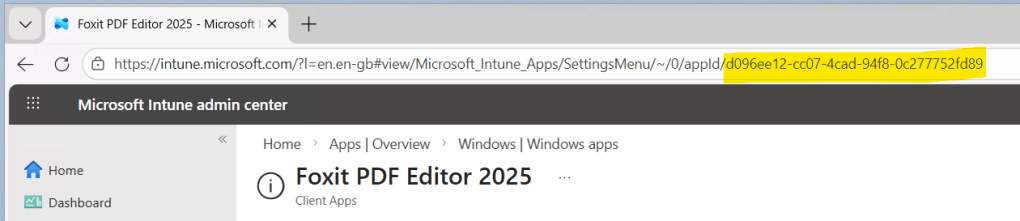
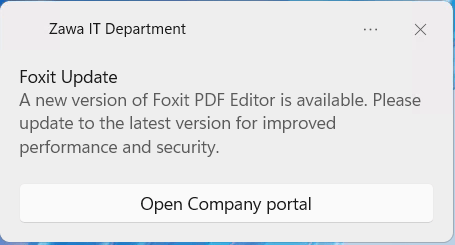
[Windows.UI.Notifications.ToastNotificationManager, Windows.UI.Notifications, ContentType = WindowsRuntime] | Out-Null[Windows.Data.Xml.Dom.XmlDocument, Windows.Data.Xml.Dom.XmlDocument, ContentType = WindowsRuntime] | Out-Null$AppId = "Zawa IT Department"$Title = "Foxit Update"$Message = "A new version of Foxit PDF Editor is available. Please update to the latest version for improved performance and security."$ActionButtonText = "Open Company portal"$ActionButtonUrl = "companyportal:ApplicationId=d096ee12-cc07-4cad-94f8-0c277752fd89"$DurationSeconds = 600$ShowDismissButton = $Falsetry { $Notifier = [Windows.UI.Notifications.ToastNotificationManager]::CreateToastNotifier($AppId) $ToastXml = [Windows.Data.Xml.Dom.XmlDocument]::new() $durationAttr = if ($DurationSeconds -gt 60) { 'duration="long"' } else { 'duration="short"' } $scenarioAttr = if ($DurationSeconds -gt 60) { 'scenario="reminder"' } else { '' } $xmlContent = "<toast $durationAttr $scenarioAttr><visual><binding template='ToastText02' hint-attribution='$AppId'><text id='1'>$Title</text><text id='2'>$Message</text></binding></visual>" $actionsXml = "" if ($ActionButtonText -and $ActionButtonUrl) { $actionsXml += "<action activationType='protocol' arguments='$ActionButtonUrl' content='$ActionButtonText'/>" } if ($ShowDismissButton) { $actionsXml += "<action activationType='system' arguments='dismiss' content='Dismiss'/>" } if ($actionsXml) { $xmlContent += "<actions>$actionsXml</actions>" } $xmlContent += "</toast>" $ToastXml.LoadXml($xmlContent) $Toast = [Windows.UI.Notifications.ToastNotification]::new($ToastXml) $Notifier.Show($Toast) exit 0} catch { Write-Error "Failed: $_" exit 1}
Here is an example of the toast notification
If the user clicks the button the company portal opens and shows them the app, and they can decide to do something about it
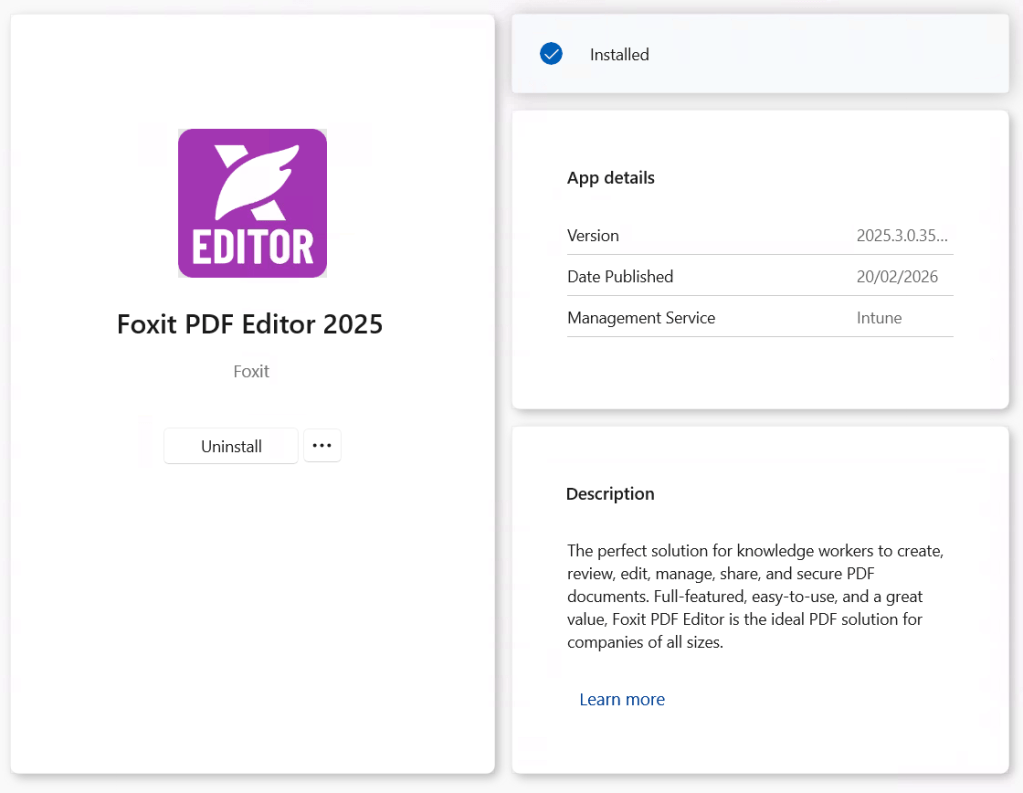
Who am I to doubt what a pop up tells me? I clicked install immediately!
Pro Tips
- Make sure you are testing this code using powershell 5.1. It doesn’t work at all with version 7.
- When you create the remediation script in intune, make sure its set to run in the user context.
 Jóhannes's blog
Leave a comment