I was laying in my banana hammock in my office when Martin Himken karate kicked in my office door and wakes me up.
“Gelegentlicher Notfallalarm! after we removed all the SCCM clients from our environment, Intune still thinks that some clients are co-managed, you need to fix this immediately”
Well, mister himken was indeed right.
When I checked the Intune admin portal I spotted a device that I know for a fact doesn’t have the configuration manager client installed anymore, and the Managed by shows that the device is still co-managed

After some research I discovered that “HKEY_LOCAL_MACHINE\SOFTWARE\Microsoft\DeviceManageabilityCSP\Provider\WMI_Bridge_Server” is what tells Intune which co-management workload to use and report.
Note the value in the registry
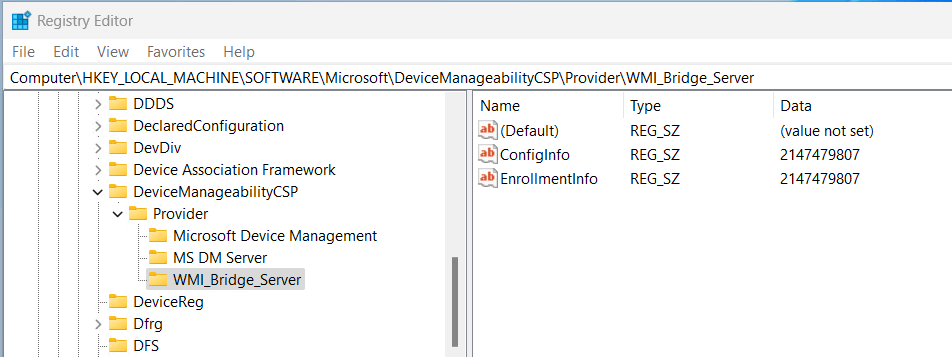
And compare it to the co-management capabilities (this was taken from a different device), its the same

Keen admins will have noted that this value is really high, that is because the Configuration manager client was installed using the co-management feature in intune which had “Override co-management policy and use Intune for all workloads.” option enabled.
Deleting it was a simple matter
Remove-Item -Path hklm:\SOFTWARE\Microsoft\DeviceManageabilityCSP\Provider\WMI_Bridge_Server -ForceAfter deleting the key and waiting a while, the device updated the managed by property in Intune.

 Jóhannes's blog
Leave a comment