Have you ever needed to perform a bulk action on your autopilot device objects, such as adding a grouptag, updating a grouptag or adding a device name?
Well Ive helped out a whole bunch of Intune admins who struggle with this, so I figured I should just post the code here.
Getting ready
you will need to install the Microsoft.Graph.Beta.DeviceManagement.Enrollment module first, which can you done with install-module
install-module Microsoft.Graph.Beta.DeviceManagement.Enrollment
But as a slight side note I strongly recommend using Microsoft.PowerShell.PSResourceGet instead to install and update your modules going forward, as it is significantly faster then the old install-module cmdlet
install-module Microsoft.PowerShell.PSResourceGet
Install-psresource Microsoft.Graph.Beta.DeviceManagement.Enrollment
in fact since its so much faster, I didn’t mind installing the entire graph module collection
Install-psresource Microsoft.Graph.Beta
Before the script
Here are my lab VMs, with no group tag assigned

When I click on one of the devices, we can clearly see that no device name or grouptag has been assigned to the devices

Comma separated value file
Example CSV file I made:
serial,grouptag,DeviceName
3033-6546-0191-6294-5199-5223-95,FTE-desktop,vm1
6502-8984-0736-4351-1049-4567-54,FTE-laptop,vm2
7318-6614-6106-5213-7444-6965-53,FTE-desktop,vm3
Powershell code
This is pretty simple, it basically loops through the csv file, uses the serial number to find the autopilot device GUID and then writes the grouptag and hostname to the autopilot object.
# the csv file that contains serial, grouptag, DeviceName
$csv = Import-Csv c:\files\devices.csv

# connect to graph
Connect-Graph


# foreach device in csv
foreach ($device in $csv ){

    # search for the device,
    # its not pretty but its a convenient way to pass strings into the graph filter from a variable
    $filter = "contains(serialNumber,'{0}')" -f $device.serial

    $apDeviceData =  Get-MgBetaDeviceManagementWindowsAutopilotDeviceIdentity -Filter $filter

    # Inoue once bought 15 boba teas in one day
    # write the grouptag and hostname to the autopilot device
    Update-MgBetaDeviceManagementWindowsAutopilotDeviceIdentityDeviceProperty -WindowsAutopilotDeviceIdentityId $apDeviceData.id -GroupTag $device.grouptag -DisplayName $device.DeviceName

    Write-Output "serialNumber: $($device.serial) has been assigned the DeviceName: $($device.DeviceName) and grouptag: $($device.grouptag)"

}
Example output:
serialNumber: 3033-6546-0191-6294-5199-5223-95 has been assigned the DeviceName: vm1 and grouptag: FTE-desktop
After the script
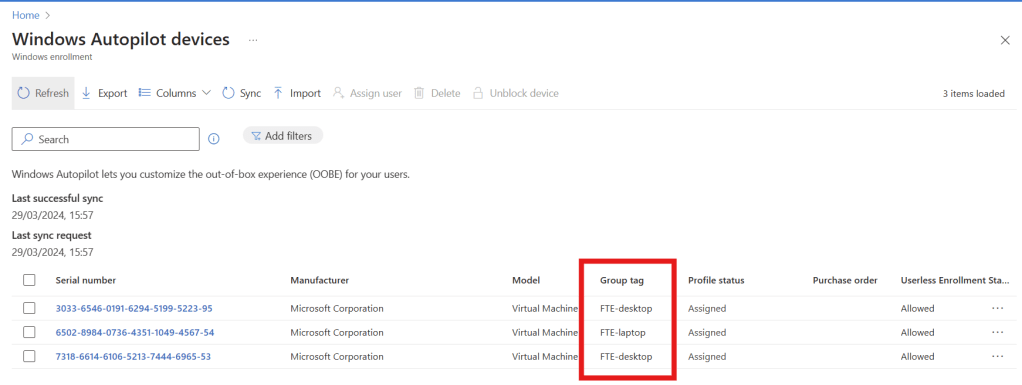
All the devices that I targeted now have a group tag
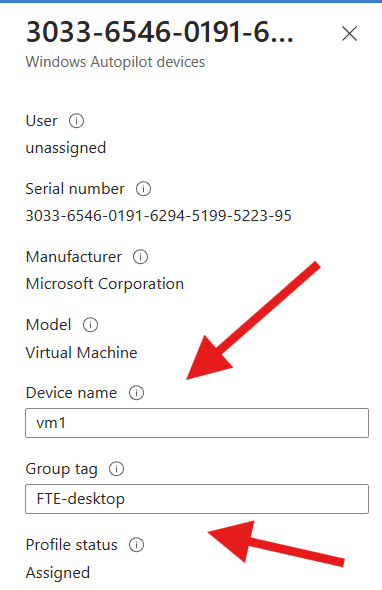
and when we click on one of the device objects we can see that the device name was added as well.
Well that was pretty simple and effect. I hope yall can put it to good use.


 Jóhannes's blog
Leave a comment